A strong and reliable WiFi connection is essential for almost everything we do online.
From streaming movies and playing online games to attending video calls, working remotely, browsing the web, and using smart home devices, our daily activities increasingly depend on a stable wireless network.
But when WiFi becomes slow, unreliable, or inconsistent, finding the actual cause can be difficult.
Is the router too far away?
Is there interference from nearby networks?
Is one room receiving a weak signal?
Are too many devices connected?
Is the WiFi channel congested?
WiFiHorizon: AI WiFi Analyzer is designed to help answer these questions.
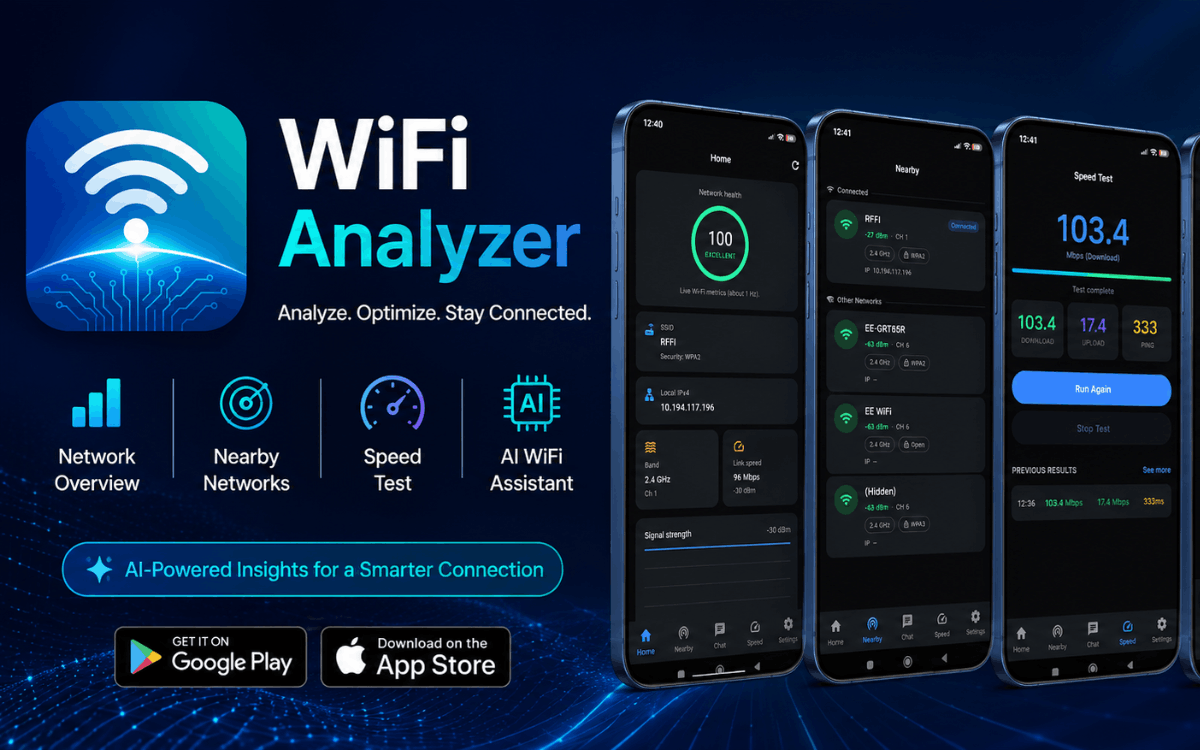
WiFiHorizon is an all-in-one WiFi analyzer and network troubleshooting app that combines real-time WiFi signal monitoring, internet speed testing, network scanning, WiFi heatmaps, channel analysis, connected-device detection, security awareness tools, and AI-powered recommendations in one easy-to-use application.
Instead of presenting users with complicated networking information alone, WiFiHorizon helps turn WiFi data into practical insights that are easier to understand and act upon.
Download WiFiHorizon: AI WiFi Analyzer
Ready to analyze and improve your WiFi connection? Download WiFiHorizon for free from your preferred app store.
Google Play
Download WiFiHorizon: AI WiFi Analyzer on Google Play
Amazon Appstore
Download WiFiHorizon on the Amazon Appstore
The Amazon Appstore version is available for compatible Amazon Fire TV and Fire Tablet devices, making WiFiHorizon useful across supported Amazon hardware as well as Android devices.
What Is WiFiHorizon?
WiFiHorizon is an AI-powered WiFi analyzer app built to make wireless network information easier to understand.
Traditional WiFi analyzer applications can expose users to technical information such as signal levels, frequencies, channels, IP addresses, BSSIDs, and network identifiers without explaining what those numbers actually mean.
WiFiHorizon takes a more practical approach.
The app brings together tools for:
- WiFi signal strength monitoring
- Internet speed testing
- WiFi network scanning
- Network health analysis
- WiFi dead-zone detection
- WiFi heatmap creation
- Channel congestion analysis
- Connected-device discovery
- Network security awareness
- AI-powered WiFi recommendations
This makes it useful for both everyday users who simply want better WiFi and more technically minded users who want additional information about their wireless environment.
WiFi Signal Strength Analyzer
One of the most important factors affecting wireless performance is WiFi signal strength.
A device may show that it is connected to WiFi, but that does not necessarily mean the signal is strong enough for reliable performance.
WiFiHorizon lets users monitor WiFi signal strength using dBm measurements and percentage indicators.
Real-time information and graphs can make it easier to understand how signal quality changes as you move around your home or office.
This can help answer questions such as:
- Is my router signal strong enough?
- Which room has the weakest WiFi?
- How much does signal strength change between rooms?
- Is moving closer to the router improving the connection?
- Where should I consider improving WiFi coverage?
Understanding these patterns can be particularly useful when troubleshooting slow connections, buffering, dropped connections, or unstable video calls.
Scan Nearby WiFi Networks
WiFiHorizon can scan nearby wireless networks and provide useful information about the WiFi environment around you.
Depending on device capabilities and Android restrictions, available information can include:
- SSID
- BSSID
- IP address
- Frequency
- Frequency band
- Network information
- Signal information
This can help users understand which wireless networks are nearby and identify potential sources of wireless congestion.
For users living in apartments, shared buildings, offices, or densely populated areas, analyzing nearby networks can be particularly useful because multiple routers may be operating in the same environment.
WiFi Speed Test
A strong WiFi signal does not always mean that your internet connection is fast.
WiFiHorizon includes internet performance testing tools that allow users to check:
- Download speed
- Upload speed
- Ping
A speed test can help users distinguish between different types of problems.
For example, if your WiFi signal is strong but internet speeds are significantly below expectations, the problem may not be WiFi coverage itself. It could involve your internet service, network congestion, router configuration, or another part of the connection.
By combining speed information with WiFi signal and network health data, WiFiHorizon provides a broader picture of network performance.
Check Your WiFi Health Score
Understanding individual WiFi measurements can sometimes be difficult.
WiFiHorizon provides a WiFi health score designed to give users a simpler overview of their network condition.
Instead of looking at multiple technical readings separately, users can review network health information and use it as a starting point for identifying potential issues.
This can be particularly helpful for people who are not familiar with networking terminology.
Find WiFi Dead Zones
WiFi dead zones are areas where wireless coverage becomes weak or unreliable.
They can occur because of:
- Distance from the router
- Walls and floors
- Furniture
- Building materials
- Wireless interference
- Router placement
- Network configuration
WiFiHorizon includes a walk mode that helps users examine WiFi signal conditions as they move around a space.
This makes it possible to identify areas where signal strength drops significantly.
For example, you could walk from your router to a bedroom, office, kitchen, basement, or another area and observe how the WiFi signal changes.
This can help you identify potential WiFi dead zones and determine where additional coverage improvements may be useful.
Create WiFi Heatmaps
For a more visual understanding of WiFi coverage, WiFiHorizon supports WiFi heatmaps.
A WiFi heatmap can provide a visual representation of wireless signal conditions across rooms or floors.
Instead of relying exclusively on individual signal readings, a heatmap can help you see broader coverage patterns.
This can be useful when:
- Planning router placement
- Investigating weak WiFi areas
- Checking coverage across multiple rooms
- Evaluating WiFi performance on different floors
- Planning improvements to wireless coverage
For larger homes and offices, visualizing coverage can make troubleshooting significantly easier.
Analyze WiFi Channels and Interference
Wireless networks operating near one another can experience congestion and interference.
WiFiHorizon provides channel analysis tools that can help users understand the wireless environment around their network.
By reviewing nearby networks and channel conditions, users can gain a better understanding of potential congestion.
This information can be useful when troubleshooting:
- Slow WiFi
- Unstable connections
- Intermittent performance
- Streaming problems
- Gaming latency
- Video-call interruptions
The goal is not simply to show technical channel information, but to help users understand whether their wireless environment could be contributing to connectivity problems.
Who Is Using My WiFi?
One of the most useful features in WiFiHorizon is its connected-device scanner.
The tool can detect devices visible on your local WiFi network and provide available device information.
Depending on your router, network configuration, device privacy settings, permissions, and Android restrictions, detected devices may include:
- Smartphones
- Computers
- Tablets
- Smart TVs
- Routers
- Other connected network devices
This allows users to review devices connected to their local network and identify devices they may not recognize.
For example, if you notice an unfamiliar device, you can investigate it further and check your router settings if necessary.
WiFiHorizon is therefore useful not only as a WiFi analyzer but also as a tool for improving network awareness.
Device detection results can vary depending on the network and the information exposed by connected devices, so the scanner should not be treated as a guaranteed identification system.
WiFi Security Awareness
Your wireless network is an important part of your digital environment.
WiFiHorizon can help users identify open or potentially insecure wireless networks and become more aware of the security characteristics of nearby networks.
Security awareness can be especially useful when connecting to unfamiliar networks or reviewing the wireless environment around your home or workplace.
The app can help users recognize potential concerns and make more informed decisions about their network configuration.
AI WiFi Assistant
One of WiFiHorizon's standout features is its AI WiFi Assistant.
Networking information can often be confusing, particularly when users encounter terms such as dBm, channel congestion, frequency bands, ping, interference, and network health scores.
The AI WiFi Assistant is designed to explain these results in simpler language and provide practical guidance.
It can help users understand:
- Weak WiFi signal readings
- Possible router placement improvements
- Slow internet performance
- WiFi congestion
- Wireless interference
- Potential causes of dead zones
- WiFi coverage issues
- Network health results
Instead of simply telling you that a signal is weak, the AI assistant can help explain what that may mean and what steps you can consider taking.
Free AI Chats
New users receive up to 5 free AI chats.
After the free AI chat allowance has been used, a subscription is required to continue using the AI WiFi Assistant.
Subscription pricing and renewal terms are displayed before purchase.
WiFiHorizon for Home WiFi Troubleshooting
WiFiHorizon can be especially useful for troubleshooting common home networking problems.
If WiFi is slow in one room but works well in another, the signal analyzer and walk mode can help identify differences in coverage.
If internet speeds appear unusually low, the speed test can provide download, upload, and ping measurements.
If several wireless networks are nearby, channel analysis can help you understand the surrounding WiFi environment.
If you are unsure which devices are connected to your network, the connected-device scanner can provide additional visibility.
Together, these tools provide a more complete approach to home WiFi troubleshooting.
Improve Router Placement
Router placement can have a significant effect on wireless coverage.
A router positioned behind obstacles, inside enclosed furniture, or far away from the areas where WiFi is most heavily used may provide less effective coverage.
WiFiHorizon can help users evaluate signal strength in different locations and use heatmaps or walk mode to understand coverage patterns.
For example, users can test WiFi around:
- Living rooms
- Bedrooms
- Home offices
- Kitchens
- Hallways
- Garages
- Basements
- Multiple floors
This information can help you make more informed decisions about router placement and wireless coverage.
Useful for Streaming, Gaming and Video Calls
Reliable WiFi is particularly important for activities that depend on consistent connectivity.
Streaming
Buffering or inconsistent streaming quality can sometimes be related to weak WiFi coverage, interference, congestion, or internet performance.
Online Gaming
Gamers can use network performance information such as ping and signal strength when investigating connection problems or latency.
Video Calls
Weak or unstable wireless connections can affect video calls and remote meetings.
WiFiHorizon can help identify areas where WiFi coverage may be weaker.
Remote Work
For people working from home, reliable wireless connectivity is essential for cloud applications, video conferences, file transfers, and other everyday tasks.
Online Learning
Students can use WiFi analysis and speed testing tools to investigate connectivity issues affecting online classes and educational services.
WiFiHorizon for Office Network Checks
WiFiHorizon isn't limited to home users.
It can also be useful for basic WiFi analysis in offices and other environments where wireless coverage needs to be evaluated.
Users can investigate:
- Signal strength
- Nearby wireless networks
- Network performance
- Coverage areas
- Dead zones
- Connected devices
- Channel congestion
For more complex enterprise networks, professional networking equipment and dedicated network-management solutions may still be appropriate.
However, WiFiHorizon can provide a convenient way to perform everyday WiFi checks from a compatible device.
Built Using Modern Mobile App Development Practices
Applications like WiFiHorizon require a combination of networking tools, real-time data visualization, performance optimization, and user-friendly interfaces.
Businesses interested in building similar Android or cross-platform applications can learn more about SpeckPro's Mobile App Development services, where we design and develop custom mobile applications for startups, SaaS products, enterprise tools, and consumer-facing platforms.
WiFiHorizon on Android, Fire TV and Fire Tablets
WiFiHorizon is available through Google Play and the Amazon Appstore.
Android
Get WiFiHorizon on Google Play.
Amazon Devices
Get WiFiHorizon on the Amazon Appstore.
The application is also available for compatible Amazon Fire TV and Fire Tablet devices.
Device compatibility and the availability of individual features may vary depending on the hardware, operating system, permissions, network configuration, and platform restrictions.
Available in Multiple Languages
WiFiHorizon is designed for users around the world and supports multiple languages.
Supported languages include:
- English
- Mandarin Chinese
- Spanish
- French
- Portuguese
- Japanese
- Arabic
- German
- Indonesian
- Russian
- Swedish
- Hindi
Language availability can vary depending on the application version, device settings, and individual features.
Why Choose WiFiHorizon?
There are many WiFi analyzer applications available, but WiFiHorizon brings several different networking tools together in a single application.
Instead of using separate apps for signal analysis, internet speed testing, connected-device discovery, heatmaps, and troubleshooting guidance, WiFiHorizon combines these capabilities into one experience.
Key Benefits
All-in-One WiFi Analysis
Monitor signal strength, network information, speed, coverage, and other WiFi conditions.
Easy-to-Understand Insights
Technical network information is presented in a way designed to be easier for everyday users to understand.
AI-Powered Assistance
Use the AI WiFi Assistant to get explanations and practical troubleshooting guidance.
WiFi Coverage Analysis
Find weak signal areas and potential dead zones using walk mode and heatmaps.
Network Device Awareness
Review devices detected on your local WiFi network.
Speed Testing
Measure download speed, upload speed, and ping.
Wireless Environment Analysis
Scan nearby networks and review channel congestion and interference.
Complete Feature Overview
WiFiHorizon includes a broad collection of WiFi and network analysis tools:
- Live WiFi signal strength monitoring
- dBm signal measurements
- Signal percentage indicators
- Real-time graphs
- Nearby WiFi network scanning
- SSID information
- BSSID information
- IP address information
- Frequency and band information
- Download speed testing
- Upload speed testing
- Ping testing
- WiFi health score
- WiFi dead-zone detection
- Walk mode
- WiFi heatmaps
- Multi-room and floor coverage analysis
- Channel congestion analysis
- Interference analysis
- Open network detection
- Potentially insecure network awareness
- Connected-device scanning
- Local network device information
- WiFi usage awareness
- AI WiFi Assistant
- Multilingual support
Who Should Use WiFiHorizon?
WiFiHorizon can be useful for a wide range of users.
Homeowners
Check wireless coverage around your home and identify areas where WiFi performance may be weaker.
Renters
Analyze wireless signal conditions in apartments and other rented properties without requiring specialized networking equipment.
Gamers
Review WiFi signal and ping performance when investigating connectivity or latency issues.
Remote Workers
Check WiFi coverage and internet performance in home offices and work areas.
Students
Investigate connection issues that may affect online learning and video classes.
Smart Home Users
Review local network devices and improve awareness of devices connected to the WiFi network.
IT and Technical Users
Use the available network information and scanning tools for convenient everyday WiFi checks.
Take Control of Your WiFi with WiFiHorizon
WiFi problems don't always have an obvious cause.
A slow connection could be related to weak signal strength.
A dead zone could be caused by distance or physical obstacles.
Poor performance could be influenced by congestion or interference.
And an unfamiliar connected device may require further investigation through your router.
WiFiHorizon brings together the tools needed to investigate these situations in one place.
With WiFi signal analysis, internet speed testing, network scanning, WiFi heatmaps, dead-zone detection, channel analysis, connected-device scanning, security awareness tools, and AI-powered recommendations, WiFiHorizon provides a practical way to understand your wireless environment.
Whether you're trying to improve WiFi coverage at home, troubleshoot slow internet, check network performance, investigate dead zones, understand connected devices, or simply learn more about your wireless network, WiFiHorizon provides a convenient collection of tools to help.
Download WiFiHorizon Today
Get WiFiHorizon: AI WiFi Analyzer for free and start exploring your WiFi signal, speed, coverage, connected devices, and network health.
Google Play
Download WiFiHorizon: AI WiFi Analyzer
Amazon Appstore – Fire TV & Fire Tablet
Download WiFiHorizon from the Amazon Appstore
WiFiHorizon: Smarter WiFi insights. Stronger connections.
Interested in building a similar app? See our mobile app development services.
Disclaimer
WiFiHorizon is an independent WiFi analysis and network troubleshooting application. Feature availability, detected information, network results, AI recommendations, device discovery results, and compatibility may vary depending on hardware, operating system version, permissions, network configuration, router capabilities, and platform restrictions. Users should verify network settings and device compatibility before relying on specific functionality.
SpeckPro Editorial Team
Mobile App DevelopmentNotes from the SpeckPro team on building, improving, and scaling digital products.