Every appointment-based business has the same fundamental challenge.
A potential customer visits the website, likes what they see, decides they want the service—and then has to figure out how to actually book it.
That moment matters more than many businesses realize.
If booking requires filling out a form and waiting for a callback, sending a WhatsApp message, making a phone call during business hours, or exchanging several emails to find an available time, the customer has plenty of opportunities to change their mind.
They may forget.
They may get busy.
Or they may simply find a competitor whose booking process takes 60 seconds instead of 20 minutes.
For salons, clinics, consultants, gyms, fitness studios, tutors, therapists, repair businesses, and other appointment-based companies, a website with booking and payment system functionality can turn that critical moment into a direct path from interest to revenue.
The basic journey becomes:
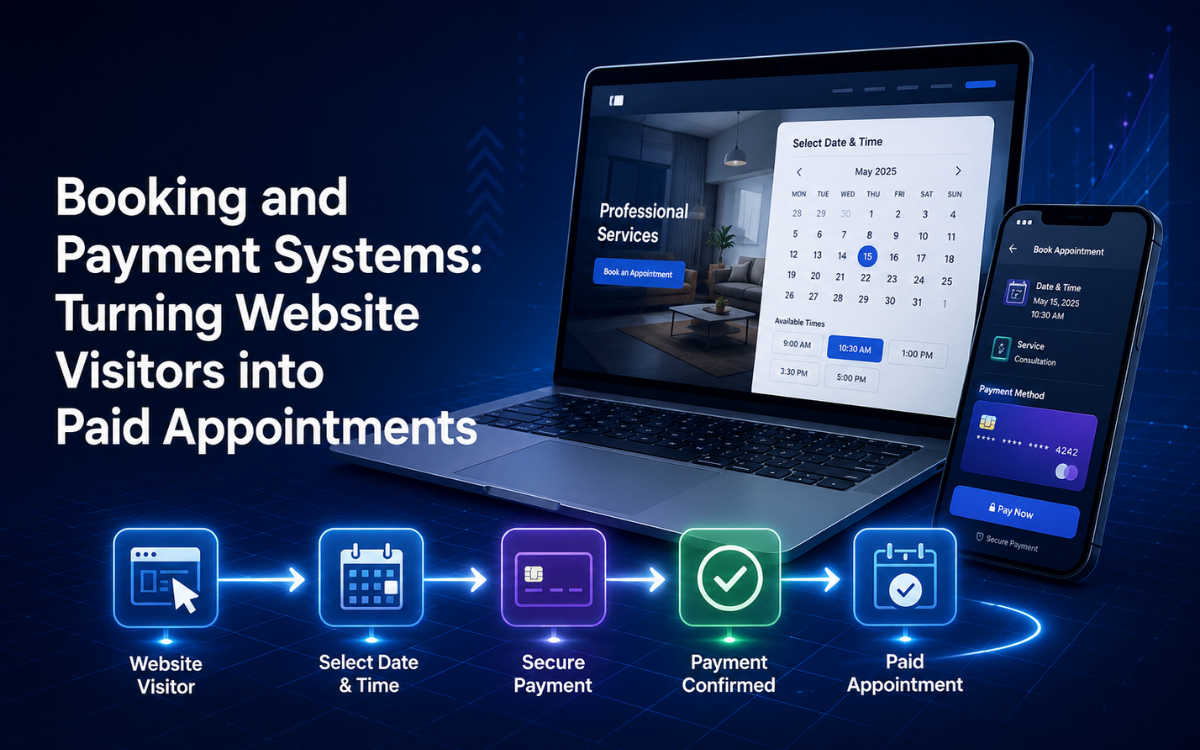
Visit website → Choose service → Select time → Pay or deposit → Receive confirmation
No unnecessary back-and-forth.
No manual scheduling.
No waiting for someone to respond.
And no uncertainty about whether the appointment is actually confirmed.
Why Online Booking Matters for Appointment-Based Businesses
Traditional appointment booking often relies on a combination of phone calls, messages, spreadsheets, calendars, and staff availability.
That may work when a business has a small number of appointments.
As demand grows, however, manual scheduling becomes increasingly difficult.
A customer might send:
"Do you have anything available Saturday afternoon?"
The staff member checks the calendar.
Then replies with two options.
The customer asks about another time.
The employee checks again.
Eventually, the appointment is confirmed.
Now multiply that conversation by dozens or hundreds of customers.
The business isn't just managing appointments.
It's managing a large amount of administrative communication around appointments.
An online booking system changes that process.
Customers can see available times themselves and choose what works.
The staff only needs to handle exceptions and more complicated requests.
What a Good Booking and Payment System Looks Like
A professional website with booking and payment should make the entire appointment process as straightforward as possible.
A typical customer journey might look like this:
Step 1: Choose a Service
The customer selects what they want.
For example:
- Haircut
- Consultation
- Personal training session
- Medical appointment
- Massage
- Beauty treatment
- Coaching session
- Fitness class
The system can display the duration, price, description, and available staff where relevant.
Step 2: Choose a Staff Member
Some businesses allow customers to choose a specific employee.
A salon customer might want a particular stylist.
A clinic patient might want a particular practitioner.
A consulting client might want a specific consultant.
If staff selection matters to the business, the booking system should account for individual schedules and availability.
Step 3: Select a Date and Time
Instead of asking the customer to submit a request and wait for confirmation, the system can show available appointment slots.
The customer chooses the time that works best.
Step 4: Enter Customer Information
The system collects the necessary information.
This might include:
- Name
- Phone number
- Service details
- Notes
- Relevant booking information
Returning customers can potentially have some information pre-filled.
Step 5: Pay or Leave a Deposit
Depending on the business model, the customer can:
- Pay the full amount
- Pay a deposit
- Reserve without payment
- Pay later
The right approach depends on the type of service and business.
Step 6: Receive Confirmation
Once the booking is successfully completed, the customer receives confirmation.
This can include:
- Appointment date
- Time
- Service
- Location
- Staff member
- Payment information
- Cancellation policy
- Booking reference
The customer should immediately know:
My appointment is confirmed.
Real-Time Availability Is One of the Biggest Advantages
One of the most important features of online booking is real availability.
A booking form that simply says:
"Submit your preferred appointment time and we'll contact you."
is not really an instant booking experience.
It creates another administrative step.
A properly connected booking system can use staff calendars, service durations, business hours, holidays, and existing appointments to determine available slots.
For example:
Monday
- 9:00 — Available
- 9:30 — Booked
- 10:00 — Available
- 10:30 — Available
- 11:00 — Booked
The customer sees what's actually available and makes a decision immediately.
This is particularly valuable outside business hours.
A potential customer may discover your business at 10 PM.
If they can book immediately, you can capture that appointment while they're ready to buy.
If the only option is to wait until morning and call, there's a greater chance the customer moves on.
Reduce the Number of Steps Between Interest and Payment
A useful way to think about booking conversion is to examine every step between:
"I want this service."
and
"I've paid for it."
For example:
High-Friction Journey
Website → Contact form → Wait → Phone call → Check availability → Confirm time → Receive payment instructions → Pay → Appointment confirmed
Lower-Friction Journey
Website → Service → Available time → Payment → Confirmation
The second process removes several opportunities for abandonment.
The objective isn't to eliminate every interaction.
Some appointments require consultation or additional information.
But whenever the booking can be straightforward, the technology should make it straightforward.
Website With Booking and Payment for Salons
Salons and beauty businesses are natural candidates for online appointment systems.
A salon website can allow customers to:
- Browse services
- Compare prices
- Choose a stylist
- Select a date
- Select a time
- Pay a deposit
- Receive reminders
- Reschedule
- Cancel
- Rebook
The customer doesn't need to call the salon simply to discover whether their preferred stylist has an opening.
Rebooking Is Particularly Important for Salons
Many salon services are recurring.
Customers may return every few weeks or months.
That makes rebooking an important part of the customer experience.
A system could make it easy for a customer to go from:
Previous appointment → Same service → Select new date → Confirm
A dedicated booking app for small business can make this even faster for loyal customers.
Instead of repeatedly searching for the business online, customers can open the app and book directly.
Booking Systems for Clinics and Healthcare Businesses
Clinics have different requirements from salons or fitness studios.
Appointments may involve:
- Multiple practitioners
- Different appointment types
- Different appointment durations
- Patient information
- Follow-up visits
- Cancellations
- Reminders
- Payments
- Records
A booking system for a healthcare business therefore needs to prioritize clarity, privacy, and appropriate access controls.
The customer should know exactly:
- Which service they're booking
- Which practitioner they're seeing
- When the appointment is
- Where it takes place
- Whether payment is required
- What they need to do before arriving
For healthcare-related systems, privacy and security requirements should be considered from the beginning rather than added later.
Booking Systems for Consultants
Consultants and professional service providers can also benefit from direct online scheduling.
Instead of:
"Email me to arrange a time."
a website can provide:
Choose consultation → Select available time → Pay → Receive confirmation
This can work particularly well for:
- Business consultants
- Coaches
- Tutors
- Legal consultations
- Financial consultations
- Marketing consultants
- Career advisors
- Training providers
For businesses that charge for consultations, integrating payment directly into the booking process can remove another administrative step.
Payments Should Be Part of the Booking Flow
One of the most important decisions for appointment-based businesses is whether to collect payment before the appointment.
In many cases, deposits or upfront payments can reduce the financial impact of no-shows.
Consider a business with 100 appointments each month.
If several customers don't show up, those empty appointment slots represent lost revenue that often cannot be recovered.
A deposit changes the customer's commitment.
It also makes the transaction clearer.
Instead of:
Book now → Pay later
the process can become:
Book → Pay deposit → Confirm
For businesses where deposits make commercial sense, integrating payment directly into the booking flow can be one of the highest-impact improvements available.
Full Payment vs. Deposit
Not every business should require full payment.
The right model depends on the service.
Full Payment
This can work well for:
- Online consultations
- Classes
- Short appointments
- Fixed-price services
- Training sessions
Deposit
Deposits can be useful for:
- High-value appointments
- Long appointments
- Services requiring preparation
- Events
- Specialized consultations
Pay at Appointment
Some businesses may prefer not to collect payment online.
Even then, online booking can still provide significant value.
The system can reserve the appointment and record that payment will happen later.
The important thing is to design the payment model around the business—not force every business into the same checkout structure.
Automated Reminders Reduce Administrative Work
People forget appointments.
That's normal.
Automated reminders can help.
A business might send:
- 48 hours before: Appointment reminder
- 24 hours before: Confirmation request
- 2 hours before: Final reminder
The exact timing should depend on the business.
For some services, one reminder is enough.
For others, multiple reminders may make sense.
The important point is that staff shouldn't have to manually message every customer.
Cancellation and Rescheduling
A good booking system should account for what happens when plans change.
Customers may need to:
- Cancel
- Reschedule
- Change services
- Change staff member
- Change appointment time
If customers can handle simple changes themselves, staff don't need to spend time managing every adjustment.
The system can also enforce business rules.
For example:
Cancel more than 24 hours before appointment → No charge
Cancel within 24 hours → Deposit retained
These rules can be configured around the company's policies.
Booking Website vs. Booking App for Small Business
A booking website and a booking app for small business serve slightly different purposes.
The website is usually better for discovery.
Customers find it through:
- Social media
- Search engines
- Advertising
- Referrals
- Shared links
A website lets a new customer discover the business and book without installing anything.
That's a major advantage.
A mobile app, on the other hand, can be particularly useful for repeat customers.
Once someone has downloaded the app, they can access the business directly.
Why Many Businesses Eventually Want Both
For established appointment-based businesses, the strongest setup may be:
Website + Booking System + Mobile App + Shared Backend
The website handles discovery.
The booking system manages appointments.
The app provides convenience for returning customers.
The backend keeps everything synchronized.
That means if a customer books on the website, the appointment appears in the app.
If they reschedule through the app, the website's booking availability updates accordingly.
The customer shouldn't have to care which interface they used.
They should simply see accurate information everywhere.
The Admin Side of a Booking System
Customers see the booking interface.
Staff need a completely different view.
A business-facing dashboard may allow staff to:
- View appointments
- Add appointments
- Reschedule bookings
- Cancel bookings
- Manage services
- Manage staff
- Set working hours
- Block unavailable dates
- Manage payments
- View customer information
- Monitor cancellations
- View reports
The administrative interface should be as easy to use as the customer-facing system.
If managing the booking system is difficult, employees may go back to spreadsheets or manual calendars.
Booking Analytics: Measure More Than Appointments
Once bookings are digital, businesses gain access to useful data.
A booking dashboard can show:
- Number of bookings
- Revenue
- Cancellation rate
- No-show rate
- Popular services
- Popular appointment times
- Staff utilization
- Repeat customers
- New customers
- Booking source
- Average booking value
This information can help businesses make better decisions.
For example:
If Tuesday mornings are consistently empty, you might offer a promotion during that period.
If one service is booked weeks in advance, you may need to add more availability.
If cancellations are increasing, your deposit or reminder policy may need adjustment.
Common Booking System Mistakes
1. Requiring a Phone Call to Confirm
If the customer has to call after submitting a booking request, you've only moved part of the process online.
Where possible, real-time confirmation is better.
2. Showing Inaccurate Availability
Nothing damages trust faster than allowing customers to select a time that isn't actually available.
Availability should be connected to the real schedule.
3. Making Payment a Separate Process
If a deposit is required, integrate it directly into the booking flow whenever practical.
4. Ignoring Mobile Users
Customers increasingly book from smartphones.
The booking interface should be designed for small screens.
5. Collecting Too Much Information
Only ask for information that is genuinely necessary.
Long forms create friction.
6. Forgetting Cancellations
Customers need a clear way to cancel or reschedule according to your policies.
7. Building the Customer Side but Ignoring Staff
A beautiful booking page doesn't help if employees still have to manually transfer appointments into a spreadsheet.
The entire workflow needs to be connected.
Build Around the Booking Workflow
One of the most common mistakes in booking software projects is starting with a long list of features.
Instead, start with the customer journey.
Ask:
- How does someone discover the business?
- How do they choose a service?
- How do they choose a staff member?
- How is availability determined?
- When does payment happen?
- What happens after booking?
- What happens if they cancel?
- How does the business prepare for the appointment?
- How does the customer rebook afterward?
Once those questions are answered, the required features become much clearer.
Why SpeckPro Builds Booking and Payment as One Connected Flow
At SpeckPro, booking and payment are approached as parts of the same customer journey rather than separate features.
The goal is to create a process where:
Customer chooses a service
↓
System checks real availability
↓
Customer selects a time
↓
Payment or deposit is collected
↓
Appointment is confirmed
↓
Customer receives notification
↓
Reminder is sent automatically
↓
Customer attends
↓
Customer can rebook
This can be delivered as a website-based booking system or extended into a mobile app for repeat customers.
The important part is the underlying architecture.
The website, app, booking system, payments, customer records, and administrative tools should work together rather than becoming isolated systems.
Frequently Asked Questions
What is a website with booking and payment system?
A website with booking and payment system functionality allows customers to select services, view availability, schedule appointments, make payments or deposits, and receive confirmation online without manual intervention.
Should a business collect deposits before appointments?
For many appointment-based businesses, deposits can reduce no-shows and improve scheduling reliability. The right approach depends on the service type, pricing model, and customer expectations.
Do small businesses need a booking app?
Not always. Most businesses should start with a booking-enabled website. A mobile app becomes more valuable when there is a large base of repeat customers who would benefit from faster rebooking, notifications, and loyalty features.
Can booking systems integrate with CRM and payment platforms?
Yes. Modern booking systems can connect with CRM software, payment gateways, accounting systems, calendars, marketing tools, and customer databases to create a more connected business workflow.
What are the biggest benefits of online appointment booking?
Online booking reduces administrative work, allows customers to schedule appointments anytime, improves customer convenience, decreases missed opportunities, and helps convert website visitors into confirmed appointments.
SpeckPro Editorial Team
Web DevelopmentNotes from the SpeckPro team on building, improving, and scaling digital products.