Android apps often request access to sensitive device features such as the camera, microphone, contacts, location, storage, and other personal information. While many permissions are necessary for apps to function properly, excessive or unexpected permission requests can raise legitimate privacy and security concerns.
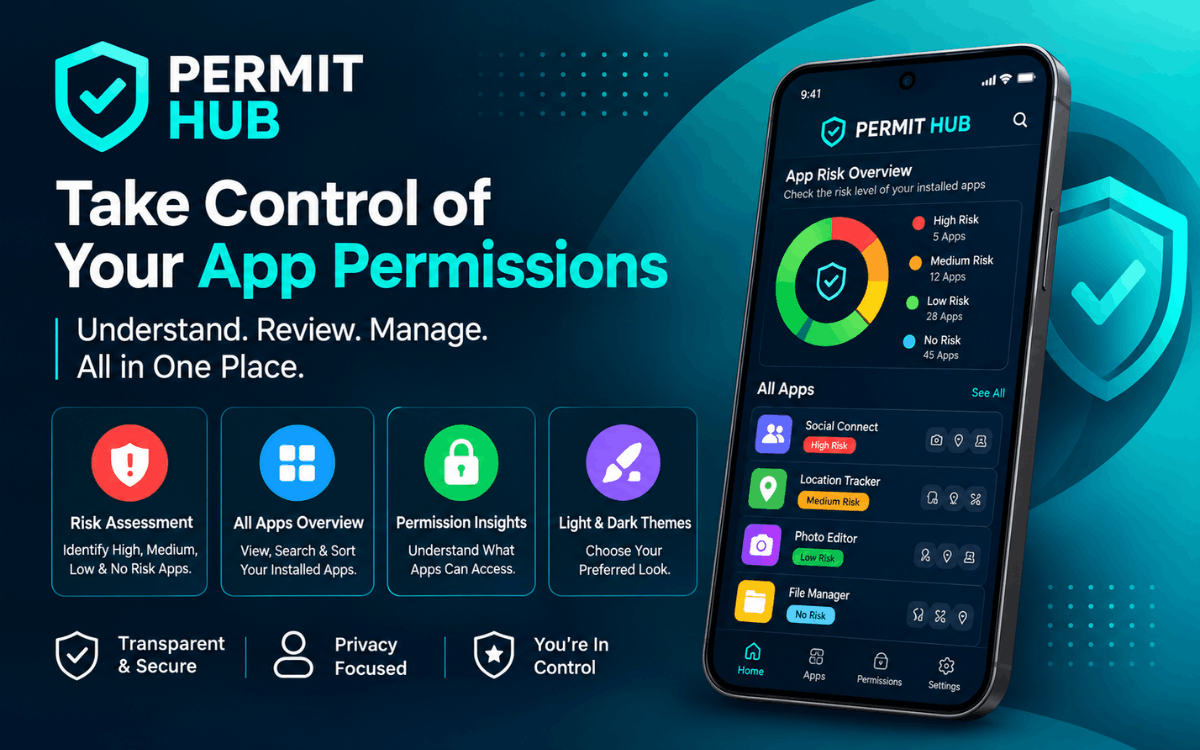
Permit Hub is a smart Android Permission Manager designed to help users better understand app permissions and identify applications that may require closer review.
Instead of navigating through multiple Android settings screens, Permit Hub provides a centralized dashboard where users can review installed apps, evaluate permission-related risks, and make more informed privacy decisions.
Whether you're conducting a routine privacy audit or simply want greater visibility into your installed applications, Permit Hub offers a simpler way to manage app permission awareness.
Download Permit Hub for Android
If you want better visibility into app permissions and potential privacy risks on your Android device, you can download Permit Hub from Google Play.
Download Permit Hub on Google Play
https://play.google.com/store/apps/details?id=com.speckpro.permithub
Looking to build a privacy-focused Android application? Explore our mobile app development services.
What Is Permit Hub?
Permit Hub is an Android permission management and app risk assessment tool designed to help users understand which permissions their installed apps request and identify applications that may warrant additional attention.
The app evaluates installed applications using factors such as:
- Requested permissions
- Permission usage patterns
- Publicly known security indicators
- Permission sensitivity levels
Based on this analysis, applications are categorized into different risk levels, making it easier for users to prioritize which apps they should review first.
This approach helps users quickly identify apps that may have excessive permissions or access to sensitive device capabilities.
Why Is an Android Permission Manager Important?
App permissions are a critical component of Android privacy and security.
When you install an app, it may request access to features such as:
- Camera
- Microphone
- Location
- Contacts
- Photos and media
- Storage
- Phone information
- Other device capabilities
Many permissions are necessary for legitimate functionality. However, understanding which permissions an app requests—and whether those permissions are appropriate—can help users make better security decisions.
Permit Hub simplifies this process by providing a centralized overview of installed applications and their permission-related information.
Key Features of Permit Hub
1. App Risk Assessment
One of the most powerful features of Permit Hub is its risk assessment system.
Installed applications are categorized into four levels:
- High Risk
- Medium Risk
- Low Risk
- No Risk
These classifications help users quickly determine which applications may deserve closer review.
High Risk Apps
High Risk apps may request excessive or sensitive permissions or demonstrate behavior patterns that warrant additional attention.
When an app receives a High Risk classification, users should review its permissions and determine whether the app's access level is appropriate for its intended functionality.
Medium Risk Apps
Medium Risk applications may request more permissions than appear necessary.
This classification does not automatically indicate that an app is unsafe, but it may justify a closer inspection.
Low Risk Apps
Low Risk apps generally have minor permission concerns according to Permit Hub's evaluation criteria.
No Risk Apps
Apps classified as No Risk typically request minimal permissions and have no known permission-related concerns based on the app's assessment.
Important: Risk classifications are intended as guidance rather than definitive proof that an application is safe or unsafe.
2. Centralized App Dashboard
Permit Hub provides a centralized dashboard where users can review installed applications from a single location.
With the dashboard, users can:
- View installed apps
- Review permission-related information
- Filter applications by risk level
- Sort apps based on permission data
- Identify apps that may require review
- Focus on higher-risk applications
This centralized approach can significantly reduce the time required to perform a privacy review.
3. Filter and Sort Apps by Risk
Many Android users have dozens—or even hundreds—of applications installed.
Permit Hub makes app reviews easier through filtering and sorting features that allow users to focus on specific risk categories.
For example, users can quickly view only High Risk or Medium Risk applications instead of manually reviewing every installed app.
4. Easy-to-Understand Permission Information
Android permission settings can sometimes be confusing, especially for less technical users.
Permit Hub presents permission-related information in a simpler and more accessible format.
Rather than making decisions on behalf of users, the app focuses on providing transparent information that helps users make their own choices.
5. Light and Dark Mode Support
Permit Hub supports both Light Mode and Dark Mode.
Users can choose the interface style that best fits their preferences and environment.
Benefits include:
- Improved visibility
- Reduced eye strain
- Better nighttime usability
- Personalized user experience
Permit Hub and Android Accessibility Service
Permit Hub utilizes Android's AccessibilityService API to assist users in understanding and navigating permission-related information.
Because Accessibility Services provide powerful device capabilities, transparency regarding their usage is important.
According to Permit Hub's functionality, Accessibility Services are used specifically to:
- Guide users to permission settings
- Read permission-related information displayed on screen
- Present information in a simpler format
- Help identify permission usage patterns
The service is intended to improve visibility and navigation—not to automatically control the device.
Does Permit Hub Automatically Change Permissions?
No.
Permit Hub does not automatically grant or revoke permissions.
All permission-related decisions remain under the user's control.
The app is designed to provide information and guidance while allowing users to decide how they wish to manage app permissions.
What Permit Hub Does Not Do
Transparency is an important aspect of privacy-focused applications.
According to the developer's disclosures, Permit Hub does not:
- Automatically change system settings
- Grant permissions without user action
- Revoke permissions without user action
- Prevent app uninstallation
- Take control of the device
- Bypass Android privacy protections
- Record audio
- Record screen content
- Collect personal data through Accessibility Services for unrelated purposes
Accessibility Services are optional and activated only after user consent.
Privacy and Data Transparency
Privacy is a core consideration for any application focused on device security.
Permit Hub states that:
- No personal or sensitive user data is collected
- User data is not sold
- User data is not shared with third parties
- Accessibility data is used only for the stated functionality
- The app follows applicable Google Play Accessibility and User Data policies
Users should always review privacy policies and Google Play disclosures before enabling optional permissions.
Who Should Use Permit Hub?
Privacy-Conscious Users
Users who regularly review app permissions can benefit from Permit Hub's centralized approach.
Android Users With Many Apps
People with large app collections can use filtering and risk classifications to simplify privacy reviews.
Users Seeking Better Permission Awareness
Permit Hub is designed to make permission-related information easier to understand, even for non-technical users.
Users Performing Routine Privacy Audits
Permit Hub can help organize and streamline regular privacy checkups.
How to Use Permit Hub for an Android Privacy Check
Step 1: Download Permit Hub
Install the application from Google Play.
Step 2: Review Installed Applications
Open Permit Hub and access the centralized dashboard.
Step 3: Check Risk Classifications
Review High Risk, Medium Risk, Low Risk, and No Risk categories.
Step 4: Examine Permissions
Inspect apps requesting sensitive permissions or access that appears unusual.
Step 5: Make an Informed Decision
If permissions seem excessive for an app's intended purpose, consider reviewing settings, restricting access, or uninstalling the app.
Why Choose Permit Hub?
Permit Hub offers several advantages for Android users concerned about privacy and security.
Better Permission Awareness
Understand which apps request sensitive permissions and identify those requiring additional review.
Centralized App Management
Review installed applications from a single dashboard.
Risk-Based Organization
Prioritize reviews using High Risk, Medium Risk, Low Risk, and No Risk classifications.
User Control
Permission decisions remain entirely under the user's control.
Transparent Accessibility Usage
Permit Hub clearly explains how Accessibility Services are used.
Simple User Experience
An intuitive interface makes permission information easier to understand.
Frequently Asked Questions
Is Permit Hub a permission manager for Android?
Yes. Permit Hub helps Android users review app permissions and understand permission-related risks while maintaining complete control over permission changes.
Can Permit Hub automatically grant permissions?
No. Permit Hub does not automatically grant permissions.
Can Permit Hub automatically revoke permissions?
No. Permission changes are always initiated by the user.
Does Permit Hub use Android AccessibilityService?
Yes. AccessibilityService is used to assist users in navigating permission-related information and settings.
Does Permit Hub record my screen?
No. According to the app's disclosures, Permit Hub does not record screen content.
Does Permit Hub record audio?
No. Permit Hub does not record audio.
Does Permit Hub sell personal information?
No. The developer states that personal and sensitive user data is not sold or shared with third parties.
Is a High Risk classification proof that an app is dangerous?
No. Risk classifications are indicators for review and should not be treated as definitive proof that an app is malicious.
Where can I download Permit Hub?
Permit Hub is available on Google Play.
Related Android Privacy Tools
If you're interested in discovering Android apps that better match your privacy preferences, you may also find our article on AppMatch AI useful.
AppMatch AI helps users discover Android applications based on factors such as:
- Offline support
- Advertising preferences
- Account requirements
- Pricing
- App features
Read more about our AI-powered app discovery platform in our guide to AppMatch AI.
Final Thoughts
As smartphones continue to play a central role in daily life, understanding app permissions has become increasingly important for maintaining privacy and security.
Permit Hub provides a practical way to review installed applications, understand permission-related information, and identify apps that may require additional attention.
Its risk assessment system, centralized dashboard, filtering tools, theme customization, and transparent AccessibilityService implementation make it a useful companion for Android users seeking greater privacy awareness.
Rather than automatically making decisions, Permit Hub focuses on transparency, education, and user control.
If you want a simpler way to review Android app permissions and improve your understanding of potential privacy risks, Permit Hub can help.
Download Permit Hub
Ready to take control of your Android app permissions?
Download Permit Hub from Google Play and start reviewing your installed apps with greater confidence.
Permit Hub — understand app permissions, review privacy risks, and stay in control of your Android security.
Interested in building a privacy, security, or utility app? Explore our mobile app development services or contact our team to discuss your project.
Disclaimer
Permit Hub is an independent Android permission management and app awareness tool. It does not automatically grant, revoke, or modify permissions without user action. App classifications are intended as informational guidance only and should not be considered definitive security assessments. Users should always review app permissions, privacy policies, developer information, and official Google Play listings before making security decisions.
SpeckPro Editorial Team
Mobile App DevelopmentNotes from the SpeckPro team on building, improving, and scaling digital products.